
by DNSFilter Team on Jul 2, 2025, 11:00:00 AM
If you've ever tried to navigate Infoblox pricing, you know the frustration: no prices on the website, multiple product lines with different licensing models, and the inevitable "contact sales for a quote" that turns a simple pricing inquiry into a potentially lengthy discovery process with demos, assessments, and negotiations.
Infoblox has established itself as the dominant force in DDI (DNS, DHCP, and IP Address Management), commanding 49.9% of the enterprise DDI market share according to IDC's 2015 report. The platform serves as the network infrastructure backbone for 350 of the Fortune 500, providing everything from IP address management to DNS security through both hardware appliances and software solutions. But this comprehensive approach to network infrastructure management comes with complexity: multiple pricing models (subscription, perpetual, consumption-based), various product lines (NIOS, BloxOne DDI, BloxOne Threat Defense), and additional costs for hardware, professional services, and premium support.
For organizations that already have DNS filtering in place, which is 80-90% of the mid-market today, the question isn't whether you need DNS security, but whether your current solution is catching threats fast enough. This is where the evaluation becomes critical.
I've spent time analyzing Infoblox's pricing structure and deployment requirements. Infoblox remains the right choice if:
- You need complete control over DNS, DHCP, and IP address management infrastructure
- Your organization requires on-premises hardware appliances or hybrid deployments
- You have dedicated network infrastructure teams with deep technical expertise
- You're managing complex, distributed networks across multiple locations
- You need enterprise features like Grid technology and extensive automation capabilities
However, if you're among the many organizations that already have DNS filtering (likely Cisco Umbrella bundled in your enterprise agreement) but are concerned about threat detection speed and network performance, there's a different conversation to have:
- You need best-in-breed threat detection that catches malicious domains faster than traditional feeds
- You want the performance advantages of the world's fastest DNS network
- You prefer solutions that deploy in minutes without sacrificing enterprise capabilities
- You're a mid-market company (1,000-5,000 employees) seeking best-of-breed over bundled solutions
- You're an MSP looking for multi-tenant capabilities with land-and-expand potential
In this case, you should evaluate DNSFilter: a best-of-breed DNS security platform that detects threats an average of 10 days sooner than competitors through proprietary AI algorithms and operates the world's fastest DNS network, without the infrastructure complexity of full DDI management.
For sophisticated security teams evaluating their DNS filtering effectiveness, I've included a detailed comparison with DNSFilter below. If you're ready to see how DNSFilter's threat detection speed compares, jump directly to the DNSFilter pricing breakdown with this link.
Table of contents
- Infoblox Pricing Summary
- Infoblox Pricing: In-Depth Overview
- Where Infoblox Falls Short for DNS Security
- Best Infoblox Alternative: DNSFilter's Best-of-Breed Approach
- Infoblox Feature Value Breakdown (vs DNSFilter)
- Infoblox Pricing FAQ
- Final Verdict: Infoblox vs DNSFilter
Infoblox Pricing Summary
|
Infoblox |
DNSFilter |
|
|---|---|---|
|
Free Trial |
|
|
|
Entry Plan |
|
|
|
Mid-Tier |
|
|
|
Enterprise |
|
|
|
Best For |
Large enterprises needing comprehensive DDI infrastructure management with on-premises or hybrid deployments | Mid-market companies (1,000-5,000 employees) and MSPs wanting best-of-breed threat detection with superior network performance |
Infoblox Pricing: In-Depth Overview
Infoblox operates through three distinct pricing models, each targeting different deployment scenarios and customer needs.
The company offers both traditional perpetual licensing and subscription-based models, particularly with its cloud-native BloxOne platform. Understanding Infoblox pricing requires navigating multiple product lines, deployment options, and add-on services, with most pricing requiring direct engagement with their sales team.
BloxOne DDI Subscription Model: Custom Pricing
|
Component |
Pricing Factors |
|---|---|
|
Base Subscription |
Tiered capacity levels |
|
Metrics |
Active IP addresses, DNS queries/month, DHCP leases/month |
|
Feature Packages |
Essentials, Business, Advanced |
|
Contract Terms |
Annual or multi-year |
|
Additional Costs |
Professional services, training |
BloxOne DDI represents Infoblox's cloud-managed future, delivered as a Software-as-a-Service solution.
Pricing depends on multiple variables including the number of active IP addresses, monthly DNS query volume, and DHCP lease requirements. Organizations must work with Infoblox sales to determine their capacity needs and receive custom pricing based on their specific environment. Note that while BloxOne is cloud-managed, hardware appliances may still be required for local service delivery at each site.
|
BloxOne Subscription Pros |
BloxOne Subscription Cons |
|
✅ Latest technology and features |
❌ No transparent pricing |
|
✅ Automatic updates included |
❌ Requires sales engagement |
|
✅ Flexible scaling options |
❌ Complex capacity calculations |
|
✅ Cloud-managed control |
❌ May require hardware appliances |
The Bottom Line 👉 BloxOne subscription suits enterprises embracing cloud transformation, but the custom pricing model makes budgeting difficult without extensive sales discussions.
NIOS Perpetual Licensing: One-Time Purchase Plus Maintenance
|
License Type |
Description |
Typical Use |
|---|---|---|
|
Static Licenses |
Tied to specific appliance |
Physical/virtual appliances |
|
Dynamic Licenses |
Floating pool on Grid Master |
Virtual environments |
|
Grid-wide Licenses |
Apply to entire Grid |
Enterprise features |
The traditional NIOS licensing model allows organizations to purchase software licenses outright with a one-time fee.
However, this requires separate maintenance contracts for updates and support, plus the cost of Trinzic hardware appliances or virtual appliance infrastructure. While offering indefinite use rights, specific NIOS versions do reach end-of-life dates requiring eventual upgrades. Infoblox continues to offer both perpetual and subscription licensing options.
|
Perpetual Licensing Pros |
Perpetual Licensing Cons |
|
✅ One-time purchase |
❌ High upfront costs |
|
✅ Indefinite usage rights |
❌ Separate maintenance fees (recurring) |
|
✅ Full control over deployment |
❌ Hardware costs additional |
|
✅ No base license renewal |
❌ Manual update process |
The Bottom Line 👉 Perpetual licensing appeals to organizations with capital budgets and long-term infrastructure plans, though ongoing maintenance fees add recurring costs.
Additional Infoblox Costs: Hardware, Services, and Support
|
Cost Category |
Typical Items |
Pricing Model |
|---|---|---|
|
Hardware Appliances |
Trinzic appliances |
Varies by model |
|
Professional Services |
Implementation, migration |
Project-based |
|
Support Tiers |
Premium, Elite maintenance |
Annual contracts |
|
Training |
Certification courses |
Per student |
|
Add-on Modules |
Advanced DNS Protection, Network Insight |
Additional licensing |
Beyond base licensing, Infoblox deployments often require significant additional investments. Hardware appliances range widely in price based on performance specifications. Professional services for implementation are commonly used for complex deployments. Premium support tiers and Technical Account Managers add recurring annual fees.
|
Additional Costs Pros |
Additional Costs Cons |
|
✅ Comprehensive service options |
❌ Costs add up quickly |
|
✅ Expert implementation support |
❌ Often needed for complex deployments |
|
✅ Various support tiers available |
❌ Premium support expensive |
|
✅ Extensive training programs |
❌ Training costs per person |
The Bottom Line 👉 The true cost of Infoblox extends well beyond licensing, with many organizations spending significantly on hardware, services, and ongoing support.
Where Infoblox Falls Short for DNS Security
While Infoblox excels at providing enterprise-grade network infrastructure management, organizations focused on DNS security effectiveness face specific challenges:
Threat Detection Speed Limitations
- Traditional threat intelligence feeds may miss new malicious domains for days or weeks
- Bad actors launch thousands of dangerous sites daily that evade standard detection
- No proprietary AI algorithms for proactive threat discovery
- Relies on industry-standard threat feeds that competitors also use
Network Performance Considerations
- DNS resolution speed depends on appliance placement and capacity
- Performance can vary based on infrastructure design and load
- Not optimized purely for DNS query speed like specialized providers
- Hardware refresh cycles needed to maintain performance
Opaque and Complex Pricing
- No public pricing requires sales engagements for basic cost information
- Multiple pricing models and product lines create confusion
- Capacity-based pricing requires detailed analysis of network metrics
- Additional costs for hardware, services, and support compound uncertainty
Deployment Complexity for Security-Focused Teams
- Full DDI platform includes more than needed for DNS protection alone
- Grid architecture requires specialized expertise
- Professional services commonly needed for proper implementation
- Weeks to months for full deployment versus minutes for cloud-native alternatives
These limitations become particularly relevant for mid-market organizations (1,000-5,000 employees) that need best-of-breed security without infrastructure complexity...
Best Infoblox Alternative: DNSFilter's Best-of-Breed Approach
DNSFilter represents a different philosophy: instead of managing network infrastructure, deliver best-of-breed DNS security with superior threat detection speed and network performance.
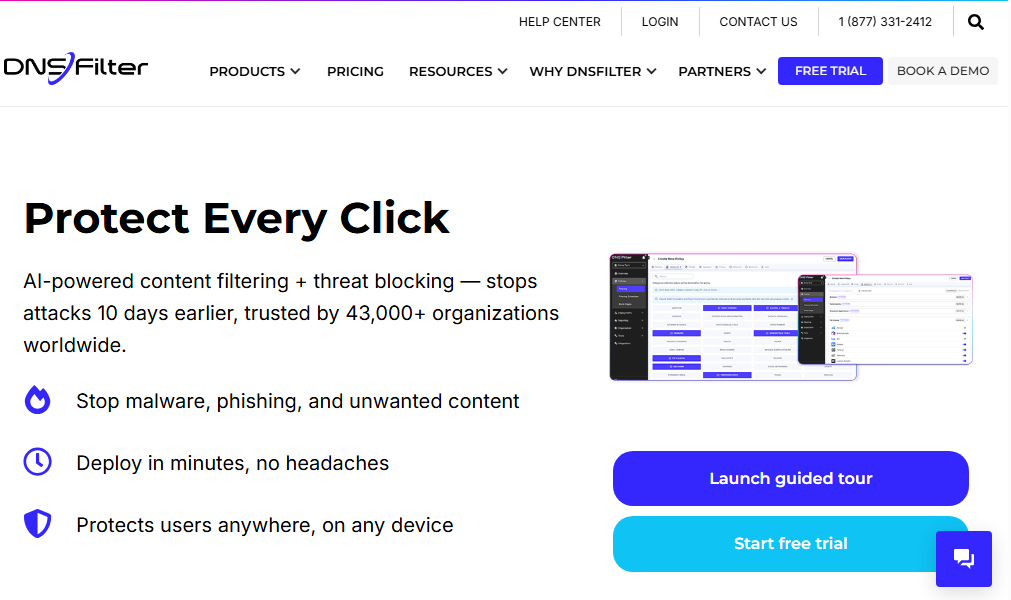
For the 80-90% of mid-market companies that already have DNS filtering, often Cisco Umbrella bundled in enterprise agreements, the question isn't whether you need protection, but whether you're catching threats fast enough.
DNSFilter detects malicious domains an average of 10 days sooner than competitors through proprietary AI algorithms that constantly crawl the internet, while operating the world's fastest DNS network for superior performance.
Founded by former MSPs who experienced these exact challenges, DNSFilter serves over 43,000 organizations with a laser focus on threat detection effectiveness. The platform analyzes billions of DNS queries daily using artificial intelligence to identify threats up to 10 days before they appear on traditional threat feeds.
DNSFilter excels for mid-market companies (1,000-5,000 employees) seeking best-of-breed over bundled solutions, MSPs needing multi-tenant capabilities with organic growth potential, and organizations switching from Umbrella or other incumbent solutions for better threat detection.
DNSFilter Basic Plan: $1/license/month
|
Feature |
Details |
|---|---|
|
Annual Price |
$1.00/license/month |
|
Monthly Price |
$1.15/license/month |
|
Minimum Spend |
$240/year or $23/month |
|
Threat Detection |
10 days sooner than competitors |
|
Network Speed |
World's fastest DNS network |
|
Security Features |
80+ content categories, AI-powered detection |
|
Deployment |
Minutes to deploy, network/relay options |
Unlike Infoblox's custom quotes, DNSFilter provides transparent pricing with enterprise-grade threat detection capabilities. The Basic plan delivers the same 10-day threat detection advantage and world's fastest DNS network that makes DNSFilter the choice for security-conscious organizations.
|
Basic Plan Pros |
Basic Plan Cons |
|
✅ 10 days faster threat detection |
❌ No roaming clients |
|
✅ World's fastest DNS network |
❌ 30-day report retention |
|
✅ Deploy in minutes |
❌ Email support only |
|
✅ No hardware required |
❌ Limited to network deployment |
The Bottom Line 👉 Basic delivers best-of-breed threat detection and network performance for organizations prioritizing security effectiveness.
DNSFilter Pro Plan: $2.10/license/month
|
Feature |
Details |
|---|---|
|
Annual Price |
$2.10/license/month |
|
Monthly Price |
$2.30/license/month |
|
Minimum Spend |
$630/year or $57.50/month |
|
Key Addition |
Roaming clients for endpoint protection |
|
Added Features |
AppAware (100+ apps), Active Directory |
|
MSP Features |
Multi-tenant management capabilities |
|
Retention |
60-day reports, 6-day query logs |
The Pro plan adds roaming client protection, a unique capability that extends the same 10-day threat detection advantage to remote workers. This tier also unlocks MSP-specific features for managing multiple clients, enabling the land-and-expand model that makes DNSFilter popular with service providers.
|
Pro Plan Pros |
Pro Plan Cons |
|
✅ Endpoint protection anywhere |
❌ No mobile clients yet |
|
✅ MSP multi-tenant ready |
❌ Still email/chat support |
|
✅ Per-user policies and API |
❌ 60-day retention limit |
|
✅ One-click app blocking |
❌ No phone support |
The Bottom Line 👉 Pro plan is ideal for mid-market companies with remote workers and MSPs building their security practice.
DNSFilter Enterprise Plan: $2.70/license/month
|
Feature |
Details |
|---|---|
|
Annual Price |
$2.70/license/month |
|
Monthly Price |
$3.00/license/month |
|
Minimum Spend |
$1,080/year or $100/month |
|
Mobile Protection |
iOS and Android clients |
|
Added Features |
90-day retention, priority support available |
|
Target Market |
Mid-market (1,000-5,000 employees) |
Enterprise adds mobile device protection while maintaining the transparent pricing model and core differentiators: 10 days faster threat detection and the world's fastest DNS network. This tier suits organizations in DNSFilter's sweet spot of 1,000-5,000 employees seeking comprehensive, best-of-breed protection.
|
Enterprise Plan Pros |
Enterprise Plan Cons |
|
✅ Complete device coverage |
❌ Premium support costs extra |
|
✅ Best for 1,000-5,000 employees |
❌ Data export additional |
|
✅ Transparent, predictable pricing |
❌ No on-premises option |
|
✅ All threat detection advantages |
❌ Cloud-only deployment |
The Bottom Line 👉 Enterprise provides best-of-breed DNS security for mid-market organizations ready to switch from incumbent solutions.
Infoblox Feature Value Breakdown (vs DNSFilter)
Comprehensive Infrastructure vs Best-of-Breed Security
Infoblox's Approach: Infoblox provides complete DDI infrastructure management including DNS, DHCP, and IPAM through its Grid technology.
This comprehensive platform requires significant expertise to deploy and manage but offers complete control over network services. Organizations get everything from IP address allocation to DHCP lease management alongside DNS services.
Source: Infoblox
DNSFilter's Approach: DNSFilter focuses exclusively on being the best at DNS security, using proprietary AI to identify threats 10 days sooner than competitors while operating the world's fastest DNS network.
This specialization enables superior threat detection and performance without infrastructure complexity. Perfect for the 80-90% of organizations that already have basic filtering but need better protection.
Our Assessment: For mid-market companies (1,000-5,000 employees) prioritizing threat detection effectiveness over infrastructure management, DNSFilter's best-of-breed approach delivers superior security outcomes.
Threat Detection Speed: The Critical Differentiator
Infoblox's Approach: Infoblox relies on industry-standard threat intelligence feeds that most vendors share.
While comprehensive, these feeds often identify malicious domains only after they've been active for days or weeks. The platform provides solid protection but doesn't differentiate on detection speed.
DNSFilter's Approach: DNSFilter's proprietary algorithms constantly crawl the internet, finding dangerous sites an average of 10 days before they appear on traditional threat feeds.
With bad actors launching thousands of malicious sites daily, this speed advantage prevents attacks that other solutions miss. This is DNSFilter's primary differentiator in an otherwise commoditized market.
Our Assessment: For organizations serious about DNS security, DNSFilter's 10-day detection advantage represents a meaningful improvement in protection, especially relevant for companies switching from Cisco Umbrella or other incumbent solutions.
Network Performance vs Infrastructure Dependencies
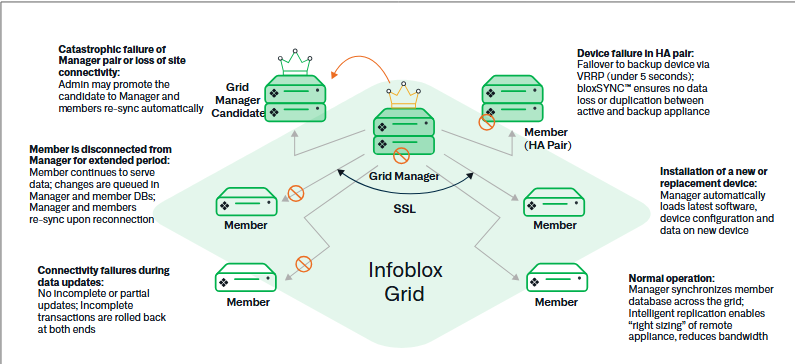
Infoblox's Approach: DNS performance depends on Grid architecture design, appliance placement, and capacity planning.
While robust, performance varies based on infrastructure decisions and requires hardware refresh cycles to maintain speed.
Source: Infoblox
DNSFilter's Approach: DNSFilter operates what they position as the world's fastest DNS network, purpose-built for speed and reliability.
Cloud-native architecture means consistent performance globally without hardware dependencies or capacity planning. Superior network speed ensures security doesn't compromise user experience.
Our Assessment: For organizations wanting predictable, best-in-class DNS performance without infrastructure variables, DNSFilter's specialized network delivers measurable advantages.
MSP and Multi-Tenant Capabilities
Infoblox's Approach: Infoblox offers multi-tenant capabilities but requires significant setup and complexity for MSP deployments.
The platform's infrastructure focus makes it challenging for smaller MSPs to start small and scale.
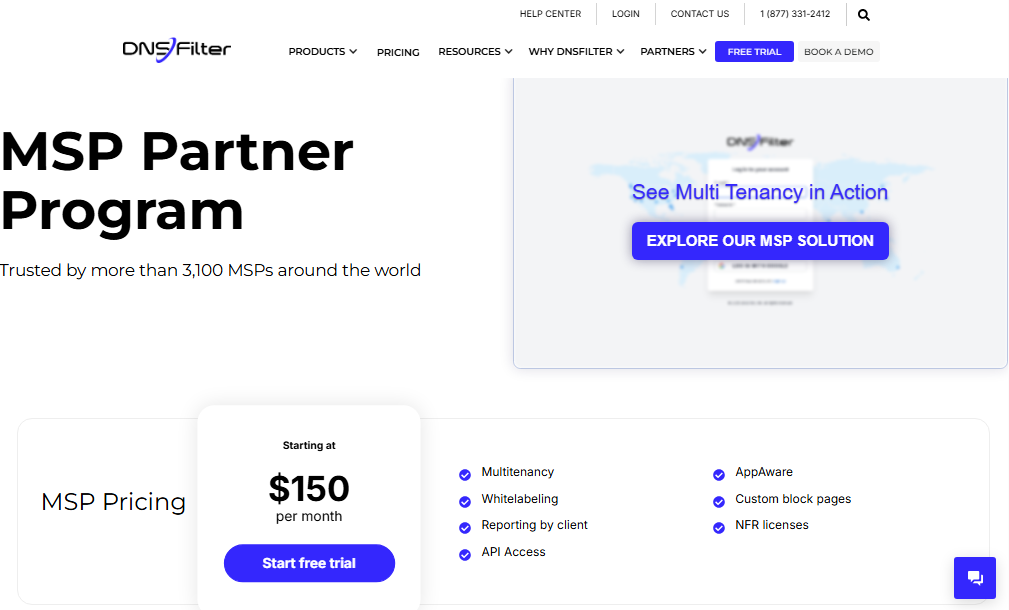
DNSFilter's Approach: DNSFilter was built by former MSPs with native multi-tenant capabilities.
The platform enables a land-and-expand model where MSPs can start with minimal investment and grow organically by adding clients. Nearly half of DNSFilter's traffic comes from smaller MSPs who expand over time.
Source: DNSFilter
Our Assessment: For MSPs building or expanding their security practice, DNSFilter's purpose-built capabilities and growth model provide clear advantages over infrastructure-focused alternatives.
Infoblox Pricing FAQ
Does Infoblox offer a free trial?
Yes, Infoblox provides a 60-day evaluation period for non-production sandbox environments.
DNSFilter offers a 14-day production trial with full features. Notably, DNSFilter offers 6 months free for organizations switching from Cisco Umbrella, recognizing that most mid-market companies already have filtering in place.
How much does Infoblox actually cost?
Infoblox requires sales engagement for pricing quotes, with enterprise deployments often involving significant investment.
DNSFilter publishes transparent pricing from $1-2.70 per user monthly. The real comparison isn't just cost but value: DNSFilter's 10-day threat detection advantage and world's fastest DNS network deliver best-of-breed capabilities.
What's included in Infoblox subscription pricing?
Subscription pricing varies with some including software and support while others require separate contracts. Hardware, professional services, and training typically cost extra.
DNSFilter includes all core security features at each tier, with the same 10-day detection advantage available even at the Basic level.
Can I switch from my current DNS filtering solution?
Most mid-market companies already have DNS filtering, often Cisco Umbrella bundled in enterprise agreements.
DNSFilter specifically targets switchers with migration support and incentives like 6 months free when switching from Umbrella. The platform deploys in minutes, making evaluation alongside existing solutions simple.
How long does implementation take?
Infoblox implementations range from weeks to months depending on scope, often requiring professional services. DNSFilter deploys in minutes for network protection, making it ideal for organizations wanting immediate improvement in threat detection without infrastructure projects.
Which is better for mid-market companies: Infoblox or DNSFilter?
For companies in the 1,000-5,000 employee range, DNSFilter typically provides a better fit.
These organizations need best-of-breed threat detection without infrastructure complexity. DNSFilter's 10-day detection advantage, world's fastest DNS network, and MSP-friendly capabilities align perfectly with mid-market requirements.
Final Verdict: Infoblox vs DNSFilter
The choice between Infoblox and DNSFilter depends on whether you need comprehensive network infrastructure or best-of-breed DNS security:
👍 Infoblox remains the enterprise DDI platform for organizations requiring complete control over DNS, DHCP, and IP infrastructure.
With custom pricing based on capacity, it enables large enterprises to manage their entire network foundation through unified Grid technology. This infrastructure-first model suits Fortune 500 companies with dedicated teams, organizations with complex on-premises requirements, and enterprises needing complete DDI control beyond security.
👉 DNSFilter is the best-of-breed choice for organizations prioritizing threat detection effectiveness and network performance.
With its 10-day threat detection advantage and world's fastest DNS network, it delivers superior security outcomes for mid-market companies (1,000-5,000 employees), MSPs seeking multi-tenant capabilities, and organizations switching from Cisco Umbrella or other incumbent solutions. The transparent pricing and minutes-to-deploy simplicity make evaluation straightforward.
See how DNSFilter compares to Infoblox and start your free trial today.
For the 80-90% of organizations that already have DNS filtering, the question isn't whether you need protection, it's whether you're catching threats fast enough.
While Infoblox asks "How can we provide complete network service control?", DNSFilter asks "How can we detect threats 10 days sooner while delivering the world's fastest DNS performance?"
The fundamental difference: Infoblox manages infrastructure. DNSFilter delivers best-of-breed security.

 SecureTransit for MSPs: Digital Privacy Without Another Tool to Manage
MSPs need to boost client security without sacrificing efficiency or margin. Every extra tool, console, or license just adds overhead and slows down service delivery.
Privacy is a classic example. Clients want their remote and hybrid users protected from the networks they connect through and the trackers profiling them, but most solutions add another siloed tool and more operational work.