
by DNSFilter Team on Jun 17, 2025, 9:45:00 AM
If you've ever received your Webroot renewal notice and discovered that your $37.49 first-year rate is jumping to $49.99, or worse, that your Total Protection Family plan is skyrocketing from $149.99 to $299.99, you know that antivirus pricing can feel like a bait-and-switch where the real cost only reveals itself after you're committed.
Webroot has established itself as a cloud-based endpoint security solution, protecting millions of devices with its lightweight agent that's under 1MB in size. The platform provides essential antivirus protection, identity monitoring, and password management through a tiered subscription model. For organizations seeking comprehensive security, implementing defense-in-depth strategies with multiple security layers has become the standard approach.
I've spent time analyzing Webroot's pricing structure and its role in a complete security stack. Webroot's plans excel if:
- You need lightweight antivirus that won't slow down your devices
- Your primary concern is protecting personal computers and mobile devices
- You value cloud-based threat detection with minimal system impact
- You want identity protection and password management in higher tiers
- You're protecting a small number of devices with predictable needs
However, organizations prioritizing best-of-breed security solutions often implement additional security layers if:
- You need threat detection that identifies dangers 10 days sooner than traditional feeds
- You want the world's fastest DNS network ensuring security without performance compromise
- You're seeking easier deployment and management than complex enterprise solutions
- You need protection that follows users anywhere, on or off the corporate network
- You're building a defense-in-depth strategy with multiple specialized vendors
For these scenarios, DNSFilter represents the leading DNS-layer security solution, providing superior threat detection speed and network performance that creates true defense-in-depth protection.
Table of contents
- Webroot Pricing Summary
- Webroot Pricing: In-Depth Overview
- Enterprise-Grade DNS Protection for Organizations
- DNSFilter: The Fastest Threat Detection Platform
- Webroot Feature Analysis
- Webroot Pricing FAQ
- Final Verdict: Building Best-of-Breed Security
Webroot Pricing Summary
| WWebroot | DNSFilter | |
| Free Plan |
|
|
| Entry Plan |
|
|
| Mid-Tier |
|
|
| High-Tier |
|
|
| Best For | Individuals and families needing device-level antivirus and identity protection | Organizations requiring enterprise-grade DNS security with superior threat detection |
Webroot Pricing: In-Depth Overview
Webroot utilizes a tiered, annual subscription model for its home security products.
The pricing is structured based on the number of devices covered and the level of features included, ranging from basic antivirus to comprehensive protection that includes identity monitoring, a VPN, and cloud backup. The company offers introductory pricing for the first year of service, with a separate, higher renewal rate for subsequent years.
Plans are categorized for both "Individual" and "Family" needs.
Webroot Essentials Plans: $37.49-$53.99 first year
|
Plan |
First Year |
Renewal |
Devices |
Key Features |
|---|---|---|---|---|
|
1 Device |
$37.49 |
$49.99 |
1 |
Core antivirus |
|
3 Device |
$41.99 |
$69.99 |
3 |
Same features |
|
5 Device |
$53.99 |
$89.99 |
5 |
Same features |
The Essentials line provides Webroot's core antivirus protection, including always-on protection against viruses, phishing, and ransomware. All Essentials plans include the Web Threat Shield to block risky sites, firewall and network monitor, and text scam detection for Android devices. The lightweight agent under 1MB ensures fast scans with minimal system impact.
|
Essentials Plans Pros |
Essentials Plans Cons |
|
✅ Lightweight agent under 1MB |
❌ Significant renewal price increase |
|
✅ Fast cloud-based scanning |
❌ Limited identity protection |
|
✅ Multiple device options |
❌ Text scam Android only |
|
✅ Includes Web Threat Shield |
❌ Basic features only |
The Bottom Line 👉 Essentials works for users wanting basic antivirus without the bloat, but those needing comprehensive identity protection or advanced features should look at higher tiers.
Webroot Premium: $77.99 first year (renews at $129.99)
|
Feature |
Details |
|---|---|
|
Price |
$77.99 first year |
|
Renewal |
$129.99/year |
|
Devices |
5 |
|
Identities |
1 |
Premium adds comprehensive identity protection to the Essentials foundation, including identity monitoring, dark web monitoring, and financial and credit bureau monitoring.
Users get access to 24/7 US-based support with identity restoration experts and up to $1M in fraud expense reimbursement. The plan also includes enhanced privacy protection that eliminates traces of online activity.
|
Premium Plan Pros |
Premium Plan Cons |
|
✅ Identity theft protection included |
❌ Significant renewal price increase |
|
✅ $1M fraud reimbursement |
❌ Only 1 identity covered |
|
✅ Dark web monitoring |
❌ No VPN included |
|
✅ 24/7 restoration support |
❌ 5 device limit |
The Bottom Line 👉 Premium delivers strong value for individuals wanting identity protection alongside antivirus, but families needing multiple identities protected should consider Premium Family.
Webroot Total Protection: $89.99 first year (renews at $179.99)
|
Feature |
Details |
|---|---|
|
Price |
$89.99 first year |
|
Renewal |
$179.99/year |
|
Features |
Everything in Premium plus VPN, parental controls, cloud backup |
|
Limitations |
Backup for 1 PC/Mac only |
Total Protection represents Webroot's most comprehensive individual consumer offering, adding a VPN for 5 devices, parental controls, and unlimited cloud storage for backup and restore. However, the backup feature is limited to just one PC or Mac, which seems restrictive given the 5-device coverage for other features.
|
Total Protection Pros |
Total Protection Cons |
|
✅ VPN included for privacy |
❌ Renewal price doubles |
|
✅ Parental control features |
❌ Backup limited to 1 device |
|
✅ Unlimited cloud storage |
❌ Expensive for families |
|
✅ Complete security suite |
❌ Still only 1 identity |
The Bottom Line 👉 Total Protection suits power users wanting every feature in one package, but the high renewal rate and single-identity limitation push many toward family plans.
Webroot Family Plans: $124.99-$149.99 first year
|
Plan |
First Year |
Renewal |
Devices |
Identities |
|---|---|---|---|---|
|
Premium Family |
$124.99 |
$249.99 |
10 |
10 |
|
Total Protection Family |
$149.99 |
$299.99 |
10 |
10 |
Family plans expand coverage to 10 devices and 10 identities, making them more suitable for households. Premium Family includes all Premium features while Total Protection Family adds VPN for all 10 devices, parental controls, and cloud backup (still limited to 1 PC/Mac).
|
Family Plans Pros |
Family Plans Cons |
|
✅ 10 devices and identities |
❌ Renewal prices hit $299.99 |
|
✅ Better per-person value |
❌ Backup still 1 device only |
|
✅ Comprehensive family protection |
❌ Significant upfront investment |
|
✅ VPN for all devices (Total) |
❌ May exceed small family needs |
The Bottom Line 👉 Family plans deliver value for larger households but the renewal rates can shock: Total Protection Family jumps from $149.99 to $299.99 annually.
Enterprise-Grade DNS Protection for Organizations
While Webroot's consumer plans focus on endpoint protection, sophisticated organizations implement defense-in-depth strategies with specialized security layers.
It's worth noting that Webroot offers its own DNS Protection service for business customers, which includes content filtering and centralized management. However, organizations prioritizing best-of-breed solutions typically select DNSFilter for its superior threat detection capabilities.
Why Organizations Choose Specialized DNS Security
- Blocks threats 10 days sooner than traditional security feeds
- Operates on the world's fastest DNS network for zero performance impact
- Deploys in minutes versus hours or days for complex enterprise solutions
- Protects users anywhere without complex VPN configurations
- Provides MSP-specific capabilities for managed service providers
Enterprise Security Requirements
Organizations with 1,000 to 5,000 employees, the core enterprise market, require:
- Threat intelligence that stays ahead of bad actors launching thousands of new sites daily
- Simple deployment and management compared to legacy enterprise solutions
- Protection that follows remote and hybrid workers seamlessly
- Granular policy controls across 80+ content categories
- Integration capabilities without vendor lock-in
Moving Beyond Bundled Solutions
Many organizations find themselves constrained by bundled security offerings that sacrifice effectiveness for convenience.
While vendors like Cisco bundle DNS protection within broader agreements, security-focused organizations increasingly choose best-of-breed solutions that excel in their specific domain. This approach ensures each security layer operates at peak effectiveness rather than accepting compromise for integration.
DNSFilter: The Fastest Threat Detection Platform
DNSFilter delivers DNS-layer security that identifies and blocks threats on average 10 days sooner than competitors through proprietary algorithms and constant Internet crawling.
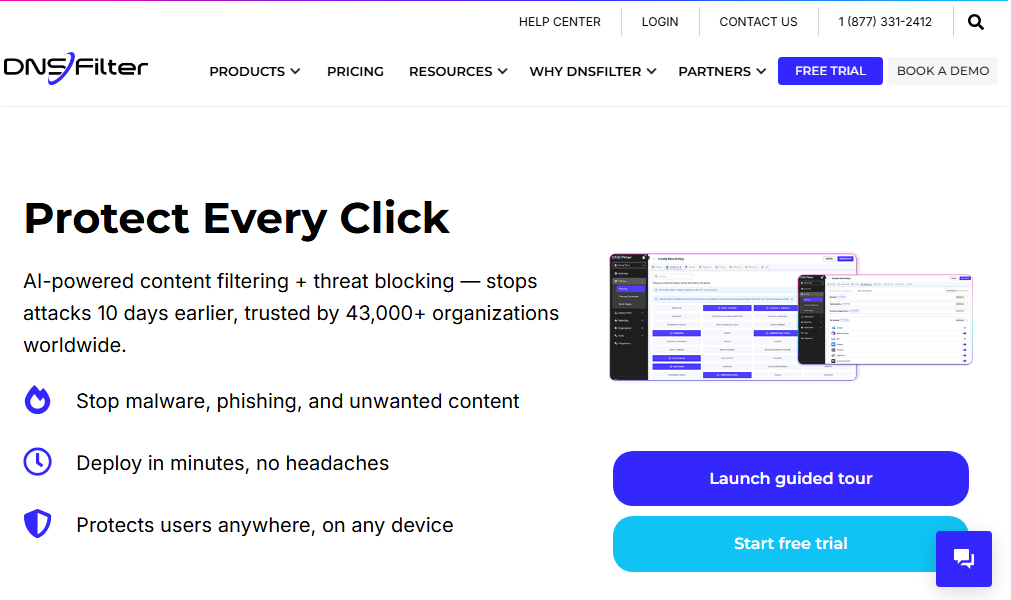
For organizations seeking the most effective DNS security layer, DNSFilter provides the industry's fastest threat detection combined with the world's fastest DNS network. According to DNSFilter's threat intelligence, their system identifies malicious domains days before traditional threat feeds, giving organizations crucial protection against zero-day threats.
When any device attempts to connect to a website, DNSFilter's proprietary algorithms check that domain against constantly updated threat intelligence. Malicious sites are blocked before any connection occurs, all while maintaining network speeds that often exceed standard DNS resolution.
DNSFilter serves organizations requiring:
- The fastest threat detection available: 10 days ahead of competitors
- Simplified deployment compared to complex enterprise alternatives like Cisco Umbrella
- Protection for users anywhere through roaming clients
- MSP-specific features for managing multiple client environments
- Best-of-breed security without vendor lock-in
DNSFilter Core Plan: Professional DNS Security
|
Feature |
Details |
|---|---|
|
Deployment |
Minutes, not hours |
|
Protection |
Phishing, malware, botnet blocking 10 days sooner |
|
Content Categories |
80+ categories for granular control |
|
Reporting |
90-day retention |
|
Network |
World's fastest DNS infrastructure |
The Core plan provides enterprise-grade DNS security with DNSFilter’s core advantage: threat detection 10 days ahead of traditional feeds. Organizations gain network-wide protection through simple router or DHCP configuration, protecting every connected device immediately, and AppAware, which blocks entire applications in one click, is included at this tier rather than held back for an upgrade.
|
Basic Plan Pros |
Basic Plan Cons |
|
✅ Fastest threat detection: 10 days sooner |
❌ No roaming client protection |
|
✅ Deploys in minutes vs. hours |
❌ Best for static networks |
|
✅ 80+ content filtering categories |
❌ Email support only |
|
✅ World's fastest DNS network |
❌ Best for static networks |
The Bottom Line 👉 Core delivers enterprise-grade protection with superior threat detection speed, ideal for organizations with primarily office-based users.
DNSFilter Plus Plan: Advanced Security Suite
|
Feature |
Details |
|---|---|
|
Added Features |
Roaming Clients for Windows, macOS, Chrome, iOS, and Android |
|
CyberSight |
User behavior analytics with AI usage reporting |
|
API Access |
Full integration capabilities |
|
Reporting |
90-day retention |
|
Management |
Per-user policies and controls |
The Plus plan extends protection beyond the office with Roaming Clients on every platform: Windows, macOS, Chrome, and mobile on iOS and Android.
CyberSight adds user behavior analytics with AI usage reporting, while per-user policies driven by Microsoft Entra or Active Directory give the granular control enterprises expect. Guest Wi-Fi comes bundled for license-based customers. This tier turns DNS protection into comprehensive security that follows users everywhere.
|
Pro Plan Pros |
Pro Plan Cons |
|
✅ Protection follows users anywhere |
❌ Mobile clients require Enterprise |
|
✅ Block applications instantly |
❌ More complex than Basic |
|
✅ Granular per-user controls |
❌ Higher resource requirements |
|
✅ Chat support included |
❌ Best for 1,000+ employee organizations |
The Bottom Line 👉 Plus suits organizations with remote workers needing protection that’s both powerful and simple to manage, unlike complex alternatives.
What about DNSFilter Enterprise?
DNSFilter still offers an Enterprise plan for organizations with custom requirements, quoted by the sales team rather than published. For most organizations, Plus is the complete platform.
Webroot Feature Analysis
Device Protection vs Network Protection
Webroot's Approach: Webroot installs a lightweight agent on each protected device, scanning files and monitoring behavior to detect and remove malware.
This device-level approach provides deep protection but only for systems with the agent installed. Each device requires individual licensing, and devices without the agent remain unprotected.
DNSFilter's Superior Coverage: DNSFilter operates at the network level with the industry's fastest threat detection, identifying dangers 10 days before competitors.
This speed advantage is crucial as bad actors launch thousands of new malicious sites daily. DNSFilter's protection extends to all devices including IoT devices, printers, and systems that cannot run traditional antivirus. Operating on the world's fastest DNS network ensures security without performance compromise.
Operating at the DNS layer with nearly 90 data centers worldwide, DNSFilter evaluates domain requests in real-time using AI-powered threat analysis.
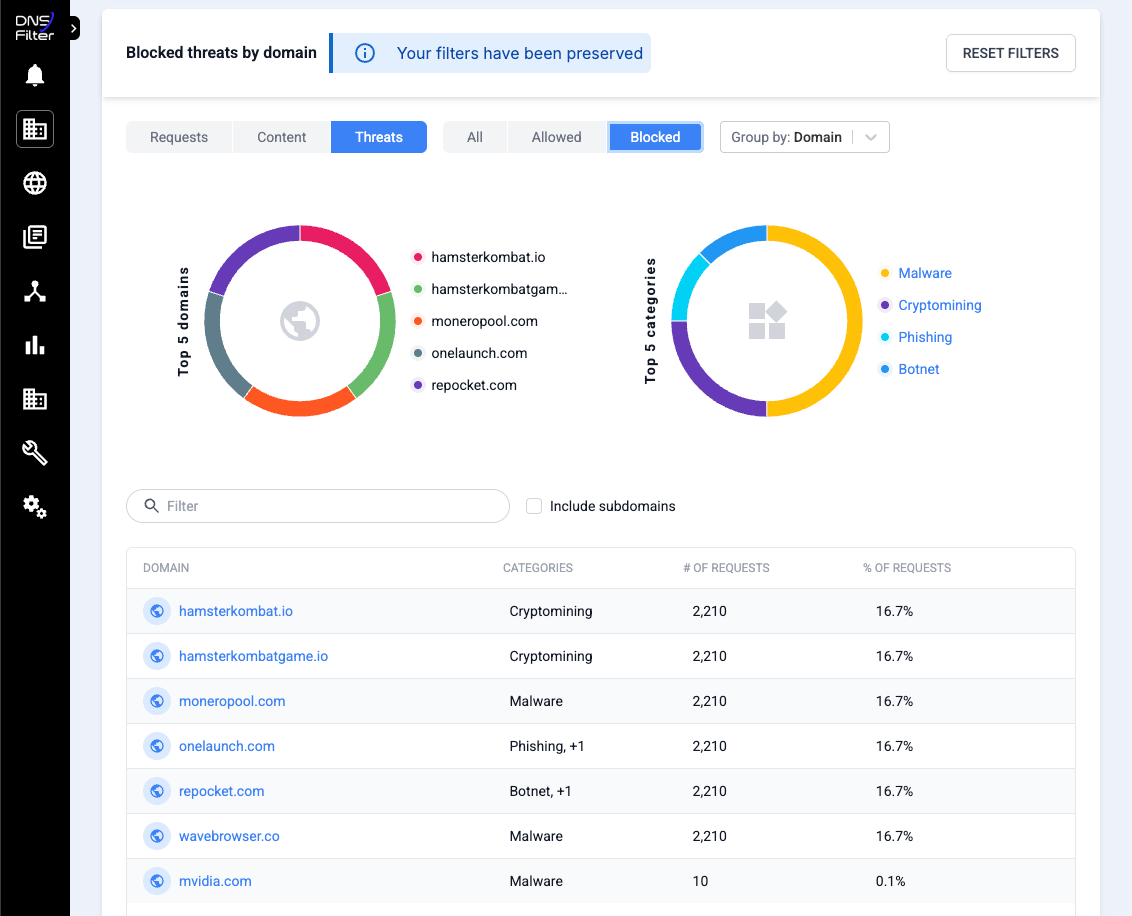
Value Verdict: Organizations implementing both endpoint and DNS protection achieve true defense-in-depth, with DNSFilter's 10-day threat detection advantage providing critical first-line defense.
Reactive Defense vs Proactive Blocking
Webroot's Approach: Webroot uses cloud-based analysis and behavioral monitoring to detect threats.
While it includes some proactive capabilities like web filtering and real-time lookups, much of its protection involves detecting and removing threats that have already reached the device.
DNSFilter's Proactive Advantage: DNSFilter's proprietary algorithms and constant Internet crawling identify threats on average 10 days sooner than traditional security feeds.
This isn't just marketing, it's the core technology that sets DNSFilter apart in a commoditized market. By blocking threats at the DNS level before devices can connect, DNSFilter prevents infections rather than treating them.
Value Verdict: DNSFilter's 10-day detection advantage combined with Webroot's endpoint protection creates multiple barriers, dramatically reducing successful attacks.
Complex Management vs Simple Deployment
Webroot's Approach: Webroot's consumer plans require device-by-device management through local agents or web portals.
While Webroot offers business plans with centralized management, these are separate products requiring different licensing and deployment models.
DNSFilter's Simplicity: DNSFilter deploys in minutes, not hours or days like complex enterprise solutions such as Cisco Umbrella.
Organizations can protect their entire network immediately through simple router configuration. Centralized policy management across 80+ content categories provides granular control without complexity. MSPs particularly value the multi-tenant capabilities that enable managing multiple clients efficiently.
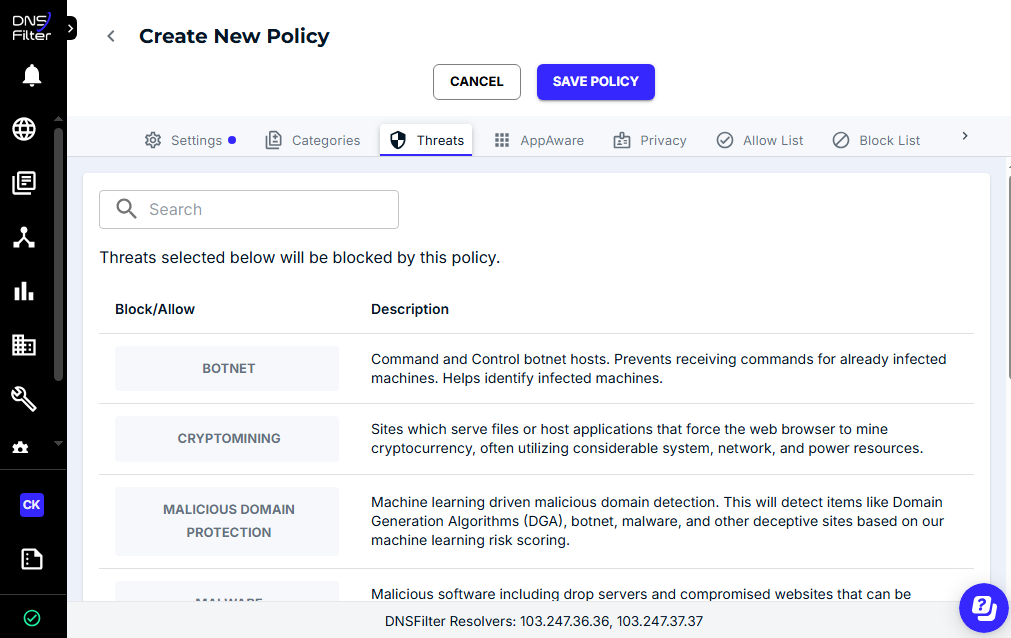
Value Verdict: DNSFilter's ease of deployment and management makes enterprise-grade DNS security accessible to organizations without large IT teams, a key advantage over legacy solutions.
Traditional Security Economics vs Best-of-Breed Investment
Webroot's Approach: Webroot's pricing escalates with multiple devices: protecting 10 devices with Premium features costs $124.99 in year one, then $249.99 annually thereafter. This per-device model becomes expensive for organizations with many endpoints.

Source: Webroot
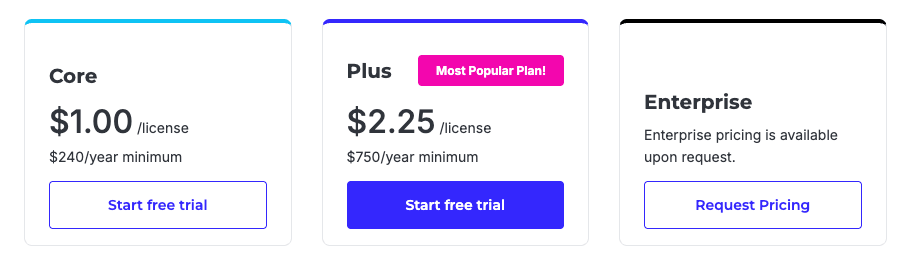
DNSFilter's Strategic Value: DNSFilter uses per-user licensing that protects all of a user's devices.
More importantly, the platform's 10-day threat detection advantage and world's fastest DNS network deliver security effectiveness that justifies investment. Organizations choose DNSFilter not for price, but for superior protection that traditional solutions cannot match.
Source: DNSFilter
Value Verdict: Security-focused organizations prioritize effectiveness over cost savings, making DNSFilter's best-of-breed capabilities worth the investment for comprehensive protection.
Webroot Pricing FAQ
Why do organizations choose DNSFilter over bundled DNS protection?
Organizations select DNSFilter for its 10-day threat detection advantage and the world's fastest DNS network.
While vendors like Cisco bundle DNS protection within broader agreements, DNSFilter's proprietary algorithms and constant Internet crawling provide superior threat intelligence. Additionally, DNSFilter deploys in minutes versus the hours or days required for complex enterprise solutions like Cisco Umbrella, with far simpler ongoing management.
What makes DNSFilter particularly valuable for MSPs?
DNSFilter includes MSP-specific features designed for managing multiple client environments.
The platform enables organic growth; small MSPs can start with their own protection then expand by adding clients with zero friction. Almost half of DNSFilter's traffic comes from companies with 100 employees and below, often MSPs who then scale up. The multi-tenant management capabilities make it simple to maintain different policies and configurations across diverse client needs.
How does DNSFilter achieve 10 days faster threat detection?
DNSFilter uses proprietary algorithms and constant Internet crawling to identify malicious domains before they appear in traditional threat feeds.
While bad actors launch thousands of new dangerous websites daily, DNSFilter's AI-powered analysis catches these threats early. This isn't theoretical, it's DNSFilter's primary differentiator in the DNS security market, providing crucial protection during the window when new threats are most dangerous.
Which organizations benefit most from DNSFilter?
DNSFilter excels for organizations with 1,000 to 5,000 employees, the "meaty middle market" where enterprises need sophisticated security but lack enormous IT teams.
Companies in regulated industries like healthcare and finance, who are often sophisticated security buyers, particularly value DNSFilter's superior threat detection. MSPs of all sizes benefit from the platform's multi-tenant capabilities and ability to scale organically.
Does DNSFilter slow down network performance?
DNSFilter operates the world's fastest DNS network with a global anycast infrastructure spanning nearly 90 data centers.
Independent testing consistently shows DNSFilter among the fastest DNS resolvers available. Organizations often experience improved browsing speeds compared to standard DNS servers while gaining enterprise-grade security. This dual advantage, fastest threat detection plus fastest network performance, is unique to DNSFilter.
Can DNSFilter replace endpoint protection like Webroot?
DNSFilter and endpoint protection serve complementary roles in defense-in-depth strategies.
DNSFilter excels at blocking malicious domains and filtering content at the network level, stopping threats 10 days before traditional feeds. Endpoint protection like Webroot handles device-level threats, USB-based malware, and provides features like identity monitoring. Best-of-breed security strategies leverage both layers for comprehensive protection.
Final Verdict: Building Best-of-Breed Security
The choice between Webroot and DNSFilter isn't either/or, it's understanding how best-of-breed solutions create superior security outcomes:
👍 Webroot provides lightweight endpoint security for individuals and families needing device-level protection against malware, viruses, and identity theft.
With pricing from $37.49 to $149.99 for the first year (renewing at $49.99 to $299.99), it protects specific devices with minimal system impact through cloud-based architecture. This per-device model serves individuals with focused security needs, families requiring identity protection, and users valuing comprehensive features including VPN and parental controls.
👉 DNSFilter delivers the industry's most advanced DNS-layer security, identifying threats on average 10 days sooner than competitors while operating the world's fastest DNS network.
Built for organizations prioritizing security effectiveness, DNSFilter provides enterprise-grade protection that deploys in minutes rather than days. With 80+ content categories, roaming client protection, and MSP-specific capabilities, it represents the best-of-breed choice for the 1,000-5,000 employee market segment where sophisticated buyers demand superior protection without the complexity of legacy enterprise solutions like Cisco Umbrella.
See how DNSFilter compares to Webroot and start your free trial today.
The fundamental advantage is clear: While Webroot asks "How can we protect this device from threats?", DNSFilter asks "How can we stop threats 10 days before anyone else?"
For organizations building defense-in-depth strategies, combining DNSFilter's proactive network-level protection with endpoint security creates multiple barriers that dramatically reduce successful attacks. This isn't about choosing the cheapest option, it's about implementing the most effective security possible.

 SecureTransit for MSPs: Digital Privacy Without Another Tool to Manage
MSPs need to boost client security without sacrificing efficiency or margin. Every extra tool, console, or license just adds overhead and slows down service delivery.
Privacy is a classic example. Clients want their remote and hybrid users protected from the networks they connect through and the trackers profiling them, but most solutions add another siloed tool and more operational work.