
by Jamie Gale on May 12, 2026, 3:55:58 PM
When we launched CyberSight in March, the goal was clear: close the visibility gap between what DNS logs show and what users actually do. Activity logs, full URL tracking, application usage, device state—the data security teams need but haven't had from their DNS provider.
With a strong foundation of user behavior data in place, we can now help our customers take visibility to the next level and empower them to make sense of this data faster than ever. Today we're delivering two new CyberSight capabilities: Threat Trends and Timeline.
Threat Trends: Where is Risk Concentrating?
Activity logs give you depth but when you're managing hundreds of users, you need a way to surface what matters without scrolling through individual events. Threat Trends provides that elevated view.
Threat Trends aggregates threat intelligence across your environment to show:
- Top observed threats:The threat categories that are appearing most frequently across your environment, ranked and trended over time.
- Top risky users: Users thats are triggering the most threat-related activity, consolidated by user (not device), with one-click drill-down into their specific threat logs.
- Observed threat activity over time: A time-series chart showing how observed and blocked threat activity is evolving, so you can spot spikes, validate policy changes, and track whether things are getting better or worse.
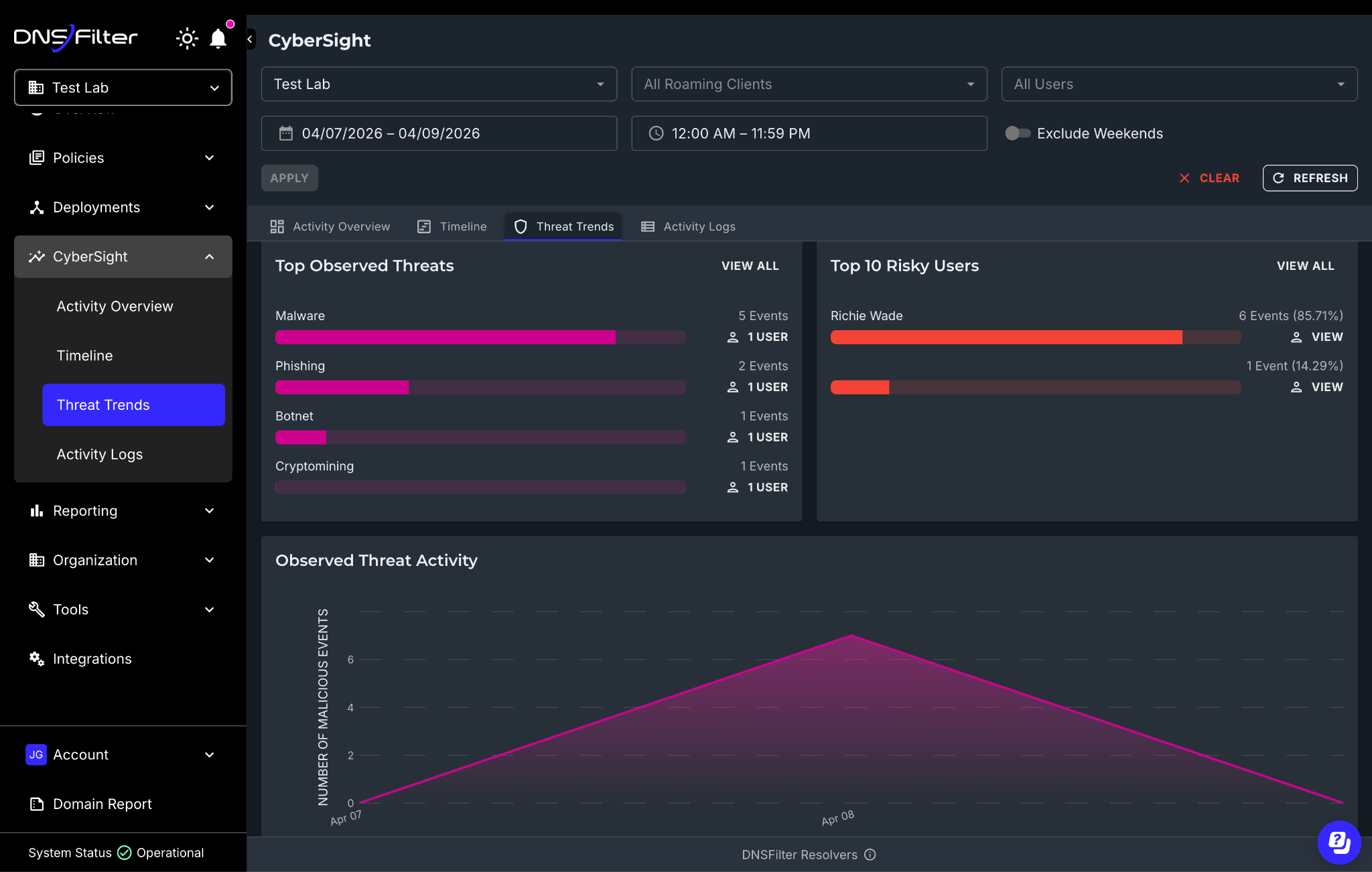
CyberSight Threat Trends dashboard showing top threats and riskiest users
All of this data is exportable via CSV through the API, so if you're building QBR reports for clients or feeding data into your own workflows, you can pull in what you need.
Why This Matters
Before Threat Trends, answering a question like "which threat categories are hitting us hardest this month?" meant manually filtering activity logs, user by user. Now you have a single view that surfaces the signal across your entire environment.
For MSPs, this is especially practical. You can pull up Threat Trends per-organization and immediately see which client environments have the highest concentration of observed threats without building custom reports or switching between tools.
Timeline: What Happened, and in What Order?
If Threat Trends tells you where to look, Timeline tells you what happened.
Timeline provides an hour-by-hour, chronological reconstruction of user activity within any given time period. It's built to support you during active investigations when you already know something is wrong and need to understand the sequence of events.
It's designed to make patterns and anomalies visible at a glance by:
- User activity breakdown: A per-user view showing active time, idle time, streaming activity, and machine lock/unlock states across the day. In single-day mode, you get granular hourly detail; in multi-day mode, you get aggregated summaries for spotting patterns over time.
- Events chart: A time-series view of event counts filterable by type (website visits, application usage, streaming). Click any point on the chart to drill directly into the underlying activity logs.
- Top activities: An interactive breakdown of the highest-volume activities by count and duration, with drill-down to filtered logs.
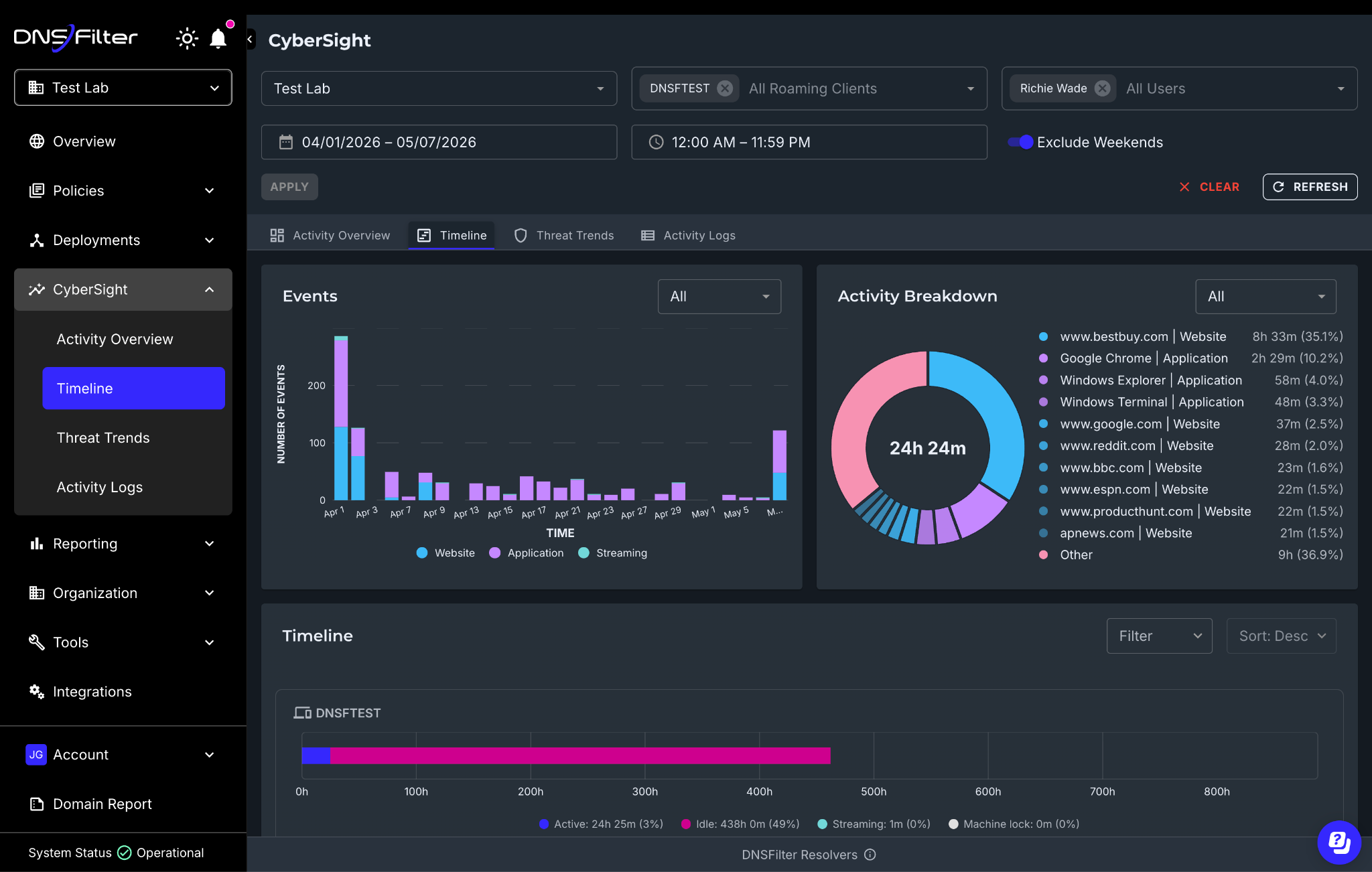
Why This Matters
This is where CyberSight goes from a visibility tool to an investigation tool.
Consider the scenario we discussed in this article: A device starts a high-speed upload to cloud storage at 2:00 AM while the user is idle. CyberSight's activity logs already capture that event. But with the Timeline, you can now reconstruct everything that user's device was doing in the hours before and after—what applications were open, which websites were visited, when the machine was locked and unlocked, and whether the activity pattern looks like a compromised device or a legitimate process.
Understanding the context of what happened when an alert is triggered is critical for validating real threats. Timeline compresses what used to be a multi-tool, multi-day investigation into something you can walk through in a single view.
What Hasn't Changed
A few things worth reiterating since the launch:
- CyberSight is included in Plus and Enterprise plans at no additional cost. Threat Trends and Timeline don't change packaging or require an add-on. This includes MSPs with Roaming Client deployments.
- Data retention remains one year. Your timeline investigations have a full 365-day forensic window.
- CyberSight is a visibility layer, not a filtering engine. It surfaces what's happening across your environment. The intelligence it provides informs your filtering policies—it doesn't replace them.
- Deployed via the DNSFilter Windows Roaming Client with browser extension support for Chrome and Edge.
What's Next
Threat Trends and Timeline complete our initial suite of capabilities for CyberSight, all working together to give you a full picture from high-level trends down to granular event forensics.
But we're not stopping here. Scheduled reports, deeper integration between CyberSight data and the DNS query log, and expanded export capabilities are all in the pipeline. We'll share more as they ship.
Try CyberSight Threat Trends and Timeline Now
If you're already a customer, Threat Trends and Timeline are live in your CyberSight dashboard today. Log in and explore.
If you're not yet using CyberSight, try it for free today.

 SecureTransit for MSPs: Digital Privacy Without Another Tool to Manage
MSPs need to boost client security without sacrificing efficiency or margin. Every extra tool, console, or license just adds overhead and slows down service delivery.
Privacy is a classic example. Clients want their remote and hybrid users protected from the networks they connect through and the trackers profiling them, but most solutions add another siloed tool and more operational work.