
by Serena Raymond on Jul 21, 2026, 7:00:00 AM
TL;DR: DNSFilter customers can now connect DNSFilter directly to Microsoft Entra ID. No sync tool, no server, no workarounds.
Almost six years ago, I opened a feature request asking for a direct connection between DNSFilter and Microsoft Entra ID (Azure AD back then) with no tool to install. And as of last week, it is live!
A huge shoutout to everyone over the years who left comments on the feature request. You added your real-world use cases along the way and told us exactly what you needed, and this launch is the answer.
What "clientless" actually means for you
This is bigger than a single connector. We rebuilt the identity foundation of DNSFilter from the ground up, and here is what you get:
Direct Entra integration without the need for sync tool
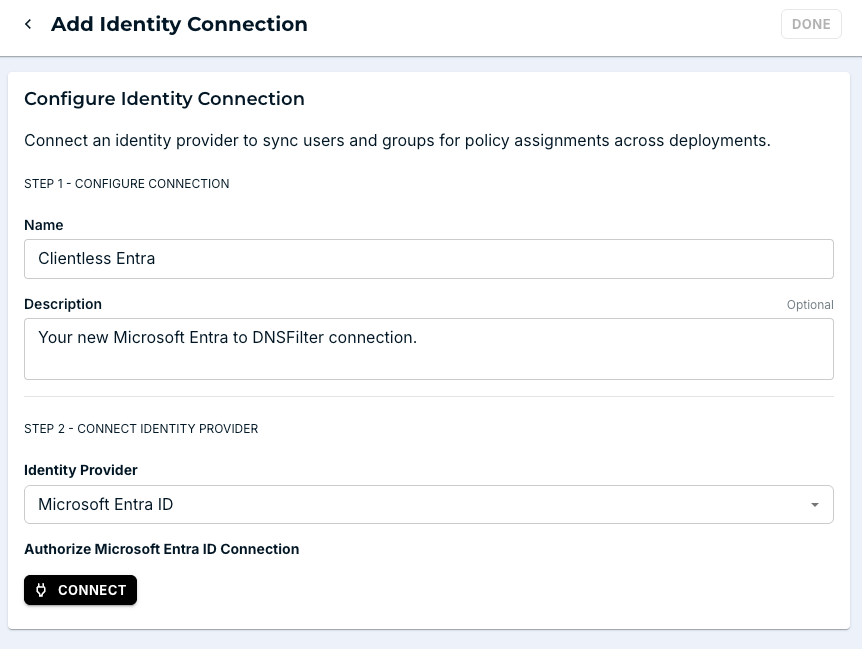
Connect your Microsoft Entra ID directory straight from the DNSFilter dashboard. You create an Identity Connection, authorize it with a single admin consent in Microsoft, and DNSFilter builds and runs the provisioning application on the Entra side for you.
From there, users and groups sync automatically through SCIM, and membership changes flow in on their own on a regular cycle. There is no additional agent to deploy and no server to babysit, which is exactly what you need if you are cloud-first and never had anywhere to put a sync tool in the first place.
Collections rebuilt for scale
Collections are how you turn identity into policy, and we rebuilt them for the size and complexity of real directories. Group users the way your organization actually works, pulling members from any combination of sources into a single Collection: Entra users and groups, AD Sync, and Roaming Clients. Assign a group and its membership syncs in full with no per-user cap within DNSFilter, so a 5,000-person department is as easy to manage as a team of five. When a user matches more than one Collection, drag-and-drop priorities keep you in control of which policy wins.
A unified Identities hierarchy
Everything identity now lives in one place: A new Identities area that brings Identity Connections, Collections, and Users together. Instead of guessing why a device landed on a certain policy, you can see how every identity source, user, and group connects, and exactly how policy is applied across Entra, Entra Hybrid, AD Sync, and Roaming Clients. When a user matches no Collection, the fallback order is fully defined. Check out our Knowledge Base for the nitty gritty.
MSP-level identity management
For our MSP partners, identity is now a tenant-level control instead of a per-client experience. Manage Users, Collections, and Identity Connections for every client straight from the MSP dashboard, with no more clicking into each organization one at a time. Onboard a new client, connect their Entra tenant, and roll out consistent policy in a fraction of the clicks.
Putting it into action
If your organization runs on Entra with no on-premise server in sight, you no longer have to bend your architecture around a legacy sync tool to assign user-based policies. You connect, you sync, and your policies stay aligned automatically across cloud and hybrid environments.
For our MSP partners, it means faster onboarding and consistent policy control across every tenant. For enterprise and IT teams, it means reliable syncing at the scale you actually operate at today.
If you have been waiting for this, you can stop waiting. Log in, head to your “Identity Connections” settings, and connect your Entra ID directly. If you are new to DNSFilter, start a free trial and see how quickly cloud-first identity and protective DNS can come together.
To everyone who voted, commented, and kept this request alive over the years: Thank you. This one is for you.
 What Web Filtering Compliance Requirements Actually Mean: CMMC, HIPAA, CIPA & PCI DSS Mapped
CMMC wants boundary protection and network monitoring. HIPAA cares about protecting electronic health data. CIPA calls for a technology protection measure. PCI DSS divides its requirements into network security, malware defense, logging, and intrusion detection. In short, web filtering compliance requirements are scattered.
 Shadow AI Is Already Causing Security Incidents
Every IT team knows employees are using AI tools nobody approved. Most have accepted it as a cost of doing business. Our new research shows that cost is already being paid in security incidents.
 DNSFilter Named Web Filtering and Control Solution of the Year in the 2026 CyberSecurity Breakthrough Awards
DNSFilter has been named Web Filtering and Control Solution of the Year in the tenth annual CyberSecurity Breakthrough Awards. Here's a look at the technology behind the win.


